Lite Mote
Overview
Lite Mode is a reduced operating profile for the BitNinja Agent designed for extreme server overload situations, typically during large-scale DDoS attacks. It allows the agent to start successfully when a normal startup would fail due to resource exhaustion, slow API responses, or heavy module initialization.
Once enabled, the agent launches only the essential protection components required to mitigate attacks and automatically attempts to return to normal operation after the server stabilizes.
How Lite Mode Works
While it is active, it starts only the essential modules:
- System
- DataProvider
- Shogun
- DosDetection
- IpFilter
It disables all other modules, including Captcha, WAF, ProxyFilter, and MalwareDetection.
Additionally, its also does the following:
- Uses stricter DoS detection thresholds.
- Loads IP sets exclusively from the local cache without contacting the BitNinja API.
- Skips synchronous startup operations such as API ping and remote configuration downloads.
- Continues running Reliable Auto Update so the Dashboard can remotely disable Lite Mode.
- Records system load metrics and periodically checks whether the server has recovered.
Automatic Recovery
Lite Mode continuously monitors server health.
The agent automatically returns to normal mode after:
- System load remains below the configured threshold.
- Connection tracking usage is below the configured limit.
- These conditions are met for three consecutive health checks (90 minutes by default).
Before restarting normally, the agent:
- Sends a lite_mode_recovered event.
- Removes the Lite Mode flag.
- Performs a normal BitNinja restart.
- Enabling Lite Mode
Dashboard (Recommended)
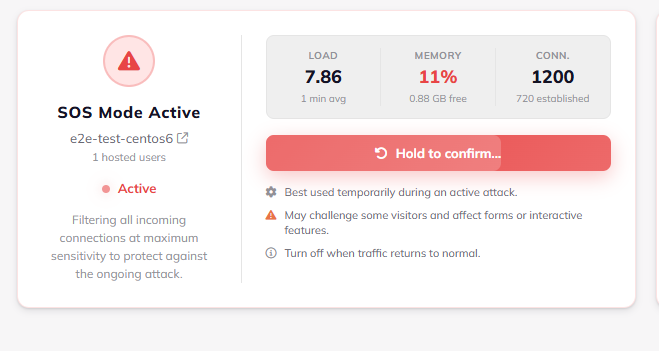
The BitNinja Dashboard can remotely enable Lite Mode through the Reliable command channel, even when the server is under heavy load.
CLI:
bitninjacli --lite-start
bitninjacli --lite-status
bitninjacli --lite-stop
Manual Activation without bitninjacli:
echo manual > /var/lib/bitninja/lite-mode.flagsystemctl restart bitninja
or
Start with the agent directly
BITNINJA_LITE_MODE=1 /opt/bitninja/bitninja
Important Files and their purpose
/var/lib/bitninja/lite-mode.flag-> Enables Lite Mode on startup/var/lib/bitninja/lite-mode.state.json-> Current Lite Mode state/var/lib/bitninja/lite-mode.baseline.json-> Baseline system metrics/etc/bitninja/lite-mode.ini-> Optional Lite Mode configuration override/var/log/bitninja/lite-mode-events.log-> Lite Mode event log
Events
The agent reports the following lifecycle events both locally and to the BitNinja API (best effort):
- lite_mode_entered
- lite_mode_alive
- lite_mode_recovered
These events allow the Dashboard and support team to monitor the Lite Mode lifecycle.
Operational Notes
Lite Mode never modifies existing module configuration files. Cached license and IP set data are recommended for maximum protection. On a fresh installation without cached data, protection is limited primarily to DoS detection and locally configured user IP lists. Exiting Lite Mode manually only requires removing the Lite Mode flag and restarting the agent.
DosDetection Optimization
In Lite Mode, DosDetection uses the optimized SsAggregate adapter instead of the legacy socket parsing pipeline. This significantly reduces CPU usage on servers with very large connection tables while maintaining identical detection behavior. The default polling interval is increased from 3 seconds to 10 seconds to further reduce system load and can be adjusted in lite-mode.ini.